Products & downloads

Get the apps.

Everything we've made, in one place. Pick your device and you're set. No account needed to look around.

LIVE
Firstlight

Firstlight

Live now

A valley of early humans that runs on its own, 24 hours a day. One real day is about one valley year. Nothing is scripted. Nothing to install: it runs right in your browser on any device.

Any browser

Phone, tablet or computer. Just open and watch.

Watch live ↗
On this site

See it running inside the live display on the home page.

Go to live display →
Home Screen

On iPhone or Android, add it to your Home Screen to keep the valley one tap away.

Open to add ↗
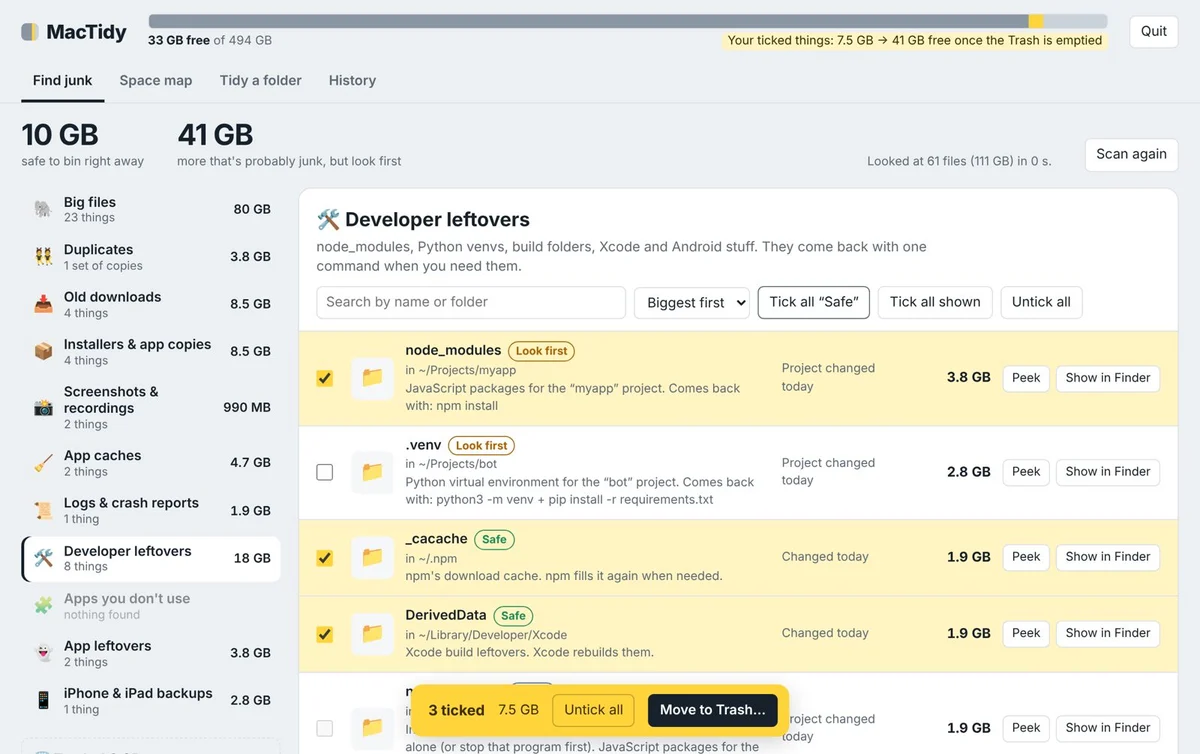

MacTidy showing junk sorted into piles like Developer leftovers and Old downloads

MacTidy

Free

Find out what's filling your Mac. MacTidy looks through every folder, hidden ones too, and sorts what it finds into clear piles: big files, duplicates, old downloads, app caches, developer leftovers and more, plus a Videos view that lists every video on your Mac. It tells you what each thing is and whether it's safe to bin. Nothing goes anywhere until you tick it, and even then it only goes to the Trash.

Mac app

Apple Silicon and Intel, macOS 11 or newer. Tiny, works offline, no account. No Terminal needed.

Download MacTidy
First time?

macOS asks you to confirm once, because we're an independent studio. About 30 seconds.

How to open it ↓
Private

Runs on a private page only your own Mac can open. Nothing is sent anywhere.

Read the FAQ ↓
MacTidy Pro app icon

MacTidy Pro

Supporter edition · $4.99

Everything in MacTidy, plus a premium look and a few extras, for people who'd like to buy us a coffee and keep MacTidy growing. Same safety rules, same privacy. It never leaves your Mac.

  • Premium themes: Graphite & Gold, Midnight and Paper
  • Export a report: everything it found, as a spreadsheet
  • Space-you've-freed counter: see your total cleaned up
  • Supports future updates to both versions
Mac app · $4.99

One-time payment, no subscription. Download link arrives by email right away.

Get MacTidy Pro
Happy with free?

That's great. MacTidy stays free, forever. Pro is just a thank-you.

Get the free one ↑
Icon of our upcoming family app

Something for families

Coming soon

A calm new app for parents and kids, made to make everyday home life a little lighter. We're polishing it now, and we'd rather show it to you when it's ready.

iPhone & Android

Launching on both. Not available yet.

Coming soon
Be the first to know

Send us a quick email and we'll tell you the day it launches. No spam.

Get notified
Install help

Two minutes, tops.

First time opening something from outside a store? Here's exactly what to tap. No Terminal, no fiddling.

Phone Home Screen

  1. Open Firstlight in Safari (iPhone) or Chrome (Android).
  2. Tap Share (iPhone, the square with an arrow) or the ⋮ menu (Android).
  3. Choose Add to Home Screen. The valley is now one tap away, full-screen.

Mac (MacTidy & Pro)

  1. Download it and double-click the .zip. Drag MacTidy into your Applications folder.
  2. Open MacTidy. The first time, macOS says it can't check it, so click Done.
  3. Open System Settings → Privacy & Security, scroll down, click Open Anyway next to MacTidy, then Open. That's the only time you'll do this. It opens straight in your browser from then on.
Questions

Good to know.

Can MacTidy delete something important?+

It only moves what you tick to the Trash, and it refuses to bin your main folders, macOS files and anything in use. Items tagged "Careful" get an extra warning, and History can put anything back until you empty the Trash.

Why does macOS ask me to click "Open Anyway"?+

Apple shows that box for apps from independent makers that haven't been through Apple's paid review yet. It's a one-time step: after you click Open Anyway once, MacTidy opens like any other app. MacTidy runs entirely on your Mac and never connects to the internet.

What's the difference between MacTidy and MacTidy Pro?+

They clean exactly the same way, with the same safety rules. Pro adds premium themes, a report you can export as a spreadsheet, and a counter of how much space you've freed. It's our way of saying thanks to people who chip in.

Does MacTidy need the internet?+

No. Everything runs on your Mac. The first time, if your Mac doesn't have Apple's free developer tools yet, MacTidy will ask you to install them (one click, from Apple). That's the only download.

Does Firstlight really keep running when I leave?+

Yes. The valley runs continuously, about one valley year for every real day, whether anyone is watching or not. Come back tomorrow and a year will have passed.

What's the family app?+

Something we're building for parents and kids. It isn't ready yet, and we'd rather show it to you when it's properly polished. Tap Get notified and we'll tell you the day it launches.

How do I know my MacTidy download is genuine?+

Every MacTidy download has a fingerprint (SHA-256). After downloading, you can open Terminal and run shasum -a 256 ~/Downloads/MacTidy.zip. It should print exactly: 0437b7c27c4a548be57d18766d70f1c236ef08337ce81ddbb6e138e33ebd276b. If it doesn't match, don't open it, and tell us. Only download MacTidy from this website.

How do I get in touch?+

Email us: contact address. We read everything.